Voiceflow Review: A Professional Look at the Tool That Simplifies AI Chatbots
The world of AI changed rapidly in 2024. Suddenly, every business wanted an AI chatbot. They wanted a smart assistant that could talk to customers, answer questions, and book appointments.
I stepped into this world in August 2024. Like many of you, I was looking for a tool that was powerful but not impossible to learn. That search led me to Voiceflow.
After months of using this platform daily to build solutions for clients, I want to share a genuine look at what this tool offers, how it works, where it shines, and where it falls short. If you are thinking about building an AI agent for yourself or your business, this breakdown will help you decide if this is the right engine for you.
The Promise of Simplicity
When you first look for chatbot tools, you often find two types. The first type is too simple and cannot do much. The second type is too complex and requires you to be a master coder. Voiceflow sits comfortably in the middle.
The biggest strength of this platform is the interface. It uses a visual canvas. Imagine a large, infinite whiteboard. On this board, you place blocks. Each block represents an action. One block might ask a question. The next block might wait for an answer.
You connect these blocks with lines to create a path. This makes the logic of a conversation visible. You do not have to guess what happens next because you can see the line connecting point A to point B.
For a beginner, this is comforting. It makes the scary task of "building AI" feel like drawing a map. You can see the flow. You can spot mistakes easily. If a conversation hits a dead end, you see it on the screen and fix it.
Growing From Beginner to Expert
I started using this tool because it was popular and approachable. There were tutorials everywhere. The platform has its own tutorials and documentation, and YouTube is full of guides. This makes the onboarding process very smooth. You can go from zero knowledge to a working bot in a single afternoon.
However, a tool needs to be more than just easy. It needs to be capable.
This is where Voiceflow earns its reputation. It is a tool that grows with you. When I first started, I used simple text blocks. As I learned more, I discovered that you can do much more.
You can use custom code inside the builder. If you know a little bit of JavaScript, you can make your bot do complex math or handle special logic. You can also use APIs. This allows your bot to talk to other software. It can check a calendar, look up a price in a database, or send an email.
This flexibility is crucial. It means you do not have to switch to a new tool once you get better. You can keep using Voiceflow for simple demos and for massive, complex client projects.
The "Brain" of the Bot: Knowledge Base
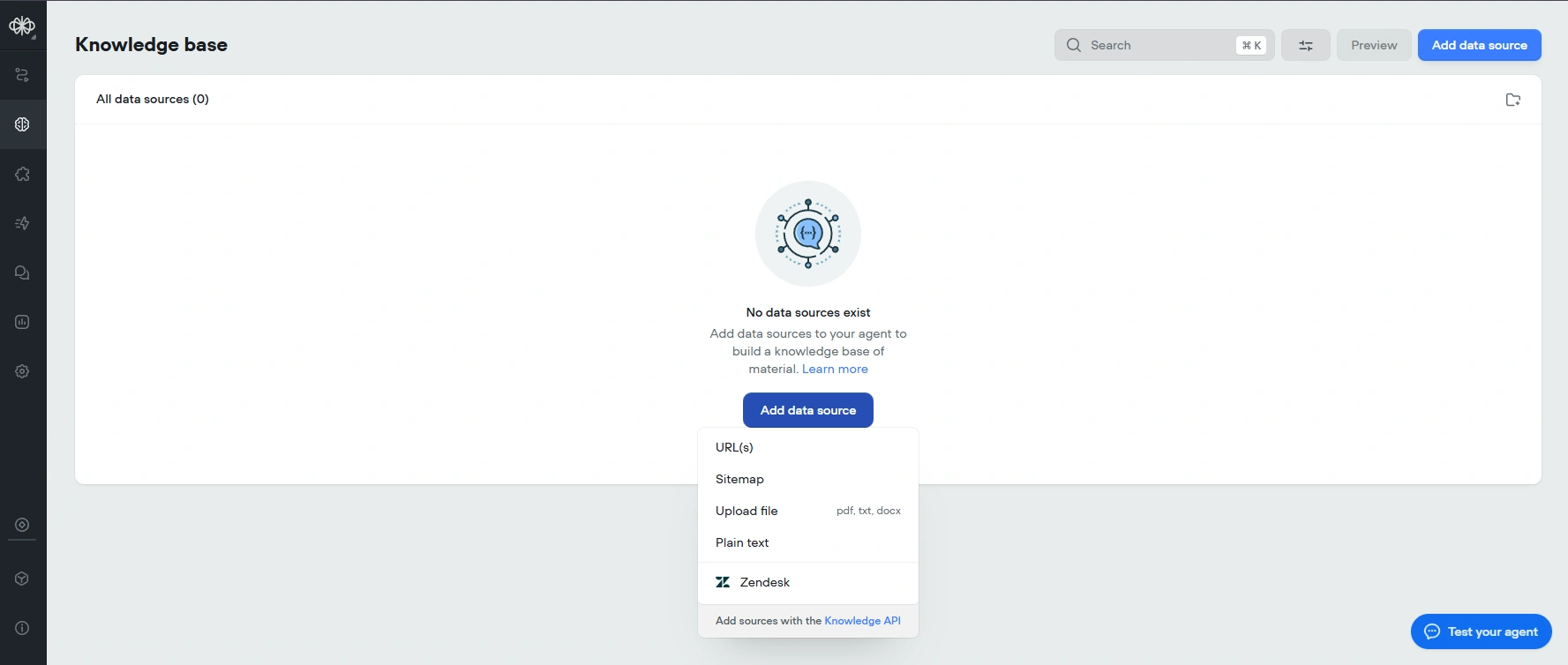 Voiceflow's Knowledge Base allows you to upload documents and URLs, giving your AI agent a reliable source of information.
One of the most valuable features for any business is the Knowledge Base. In the tech world, this is often called RAG.
Here is how it works in simple terms. You have a document. Maybe it is a PDF of your company rules, or a link to your website. You upload this file to Voiceflow. The AI reads it. It learns it.
Then, when a user asks a question, the bot looks at that file and gives an answer based on what it read.
I have found this to be incredibly fast and accurate. It rarely makes things up. For a customer support bot, this is the most important thing. You want your bot to give the right answer, not a creative one. Voiceflow handles this very well. It makes the bot feel smart and trustworthy.
Real World Application
I have used this platform to sell solutions to real businesses. The types of bots you can build are varied.
I have built customer support agents that work 24 hours a day. I have built lead generation bots that collect names and phone numbers for sales teams. I have even built appointment schedulers.
The value here is automation. A business owner does not have to answer the same question fifty times a day. The bot does it. This saves time and money. Voiceflow makes building these solutions quick. You can test them, see how they work, and fix them in real time.
The Flaws: Where It Could Be Better
No software is perfect. To give you a trustworthy review, I must be honest about the downsides.
The biggest issue I have faced is the design of the chat window.
When you put the chatbot on a website, it appears as a little bubble in the corner. When you click it, a window opens. Voiceflow gives you very little control over how this looks. You can change the main color. You can add a logo. That is about it.
If you want a chat window that looks truly unique or matches a very specific luxury brand style, you are stuck. You cannot change the shape of the bubbles. You cannot change the fonts easily.
To fix this, you have to use extra tools. I have used tools like CONVOCORE (previously known as Tixae Agents) to change the design. Or, you have to write custom code to build your own window. For a "no-code" tool, this is a limitation. A premium brand often wants a premium look, and Voiceflow makes that hard to achieve out of the box.
Another point to consider is the free plan. It is great for testing, but it limits you to only two projects. If you are a creator who likes to have five or six different ideas going at once, you will hit a wall quickly. You will have to delete old work to make room for new work, or you will have to pay.
Deployment and Integrations
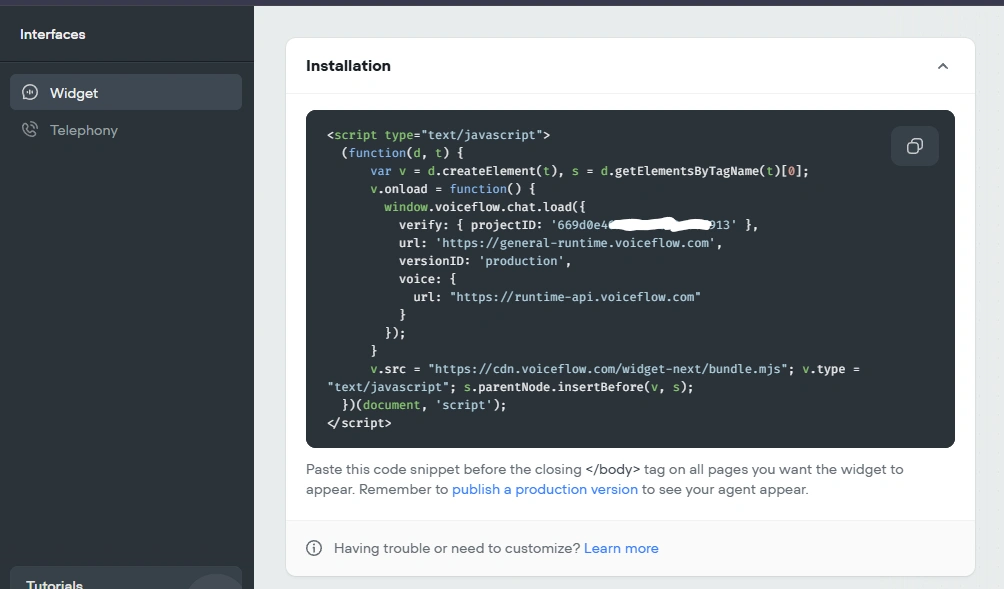 Deploying your Voiceflow bot is straightforward, with options to embed it on websites.
A bot is useless if it sits inside the builder. You need to put it where people are.
Voiceflow makes it very easy to put a bot on a website. It gives you a snippet of code, you paste it, and you are done.
It also supports other channels like WhatsApp or Discord. However, these are not always direct "one-click" connections. Often, you need to use an intermediary tool like Make.com to bridge the gap.
While this works fine, it adds a step. It means you have to learn another tool just to get your bot on WhatsApp. It would be nicer if this was all built directly inside Voiceflow, but for now, it is manageable.
The Verdict: The Ratings
Based on my experience delivering these bots to clients, here is how I rate the platform.
Ease of Understanding: 9.1 It is intuitive. The visual nature of the blocks removes the confusion that usually comes with programming.
Setup & Onboarding: 8.0 You can get started fast. The resources are there. The community is active.
Pricing & Value: 9.2 The cost is very fair. The amount of value you can provide to a business using this tool is huge compared to the monthly subscription price.
Features: 9.0 It has the essentials. The AI text generation, the Knowledge Base, and the logic blocks are all powerful.
Integrations: 8.4 It connects to almost anything via API. The native integrations for social media could be smoother, but the capability is there.
Reliability: 9.0 I have rarely seen it go down. It is a stable platform that you can trust with your traffic.
Speed & Performance: 9.5 The response times are excellent. The AI thinks fast.
Support & Docs: 8.3 The documentation is clear. It is easy to find answers when you get stuck.
Customization: 2.0 This is the weak point. The visual design of the widget is too rigid.
Usefulness / ROI: 8.8 For a business, this tool pays for itself quickly. It automates tasks that humans used to do.
Final Thoughts
Voiceflow is a bridge. It bridges the gap between having an idea for an AI assistant and actually having one that works.
It is professional enough for top-level experts but warm enough for beginners. It does not scare you away with jargon. It invites you to build.
Is it perfect? No. The design limitations on the widget are frustrating for those who care about aesthetics. But the engine inside is robust. It is smart, fast, and reliable.
If you are looking to build a customer support bot, a lead generation tool, or just want to explore what AI can do, this is a safe and powerful place to start. It served me well when I was a novice in August, and it serves me well now as I build complex solutions for clients.
It is a tool that respects your time and empowers your creativity. In the modern tech world, that is a very valuable thing to have.